BUILD SMARTER SOFTWARE
with Machine Learning
PredictionIO is an open source machine learning server for software developers to create predictive features, such as personalization, recommendation and content discovery.
http://prediction.io/

BUILD SMARTER SOFTWARE
with Machine Learning
PredictionIO is an open source machine learning server for software developers to create predictive features, such as personalization, recommendation and content discovery.
http://prediction.io/
Free quota
Usage is free for all users, up to 100 queries per day.
Paid Usage
Any usage beyond the free usage quota will fail if you are not signed up for billing. Once you have enabled billing, you will continue to receive 100 free queries per day. However, you will be billed for all additional requests at the rate of $5 per 1000 queries, for up to 10,000 queries per day. If you need additional quota, please request additional quota from the console.
Instafeed.js is a dead-simple way to add Instagram photos to your website. No jQuery required, just plain ‘ol javascript.
http://instafeedjs.com/
Photos weren’t taken by me!
I wish!
Images by Taylor Hatmaker for ReadWrite
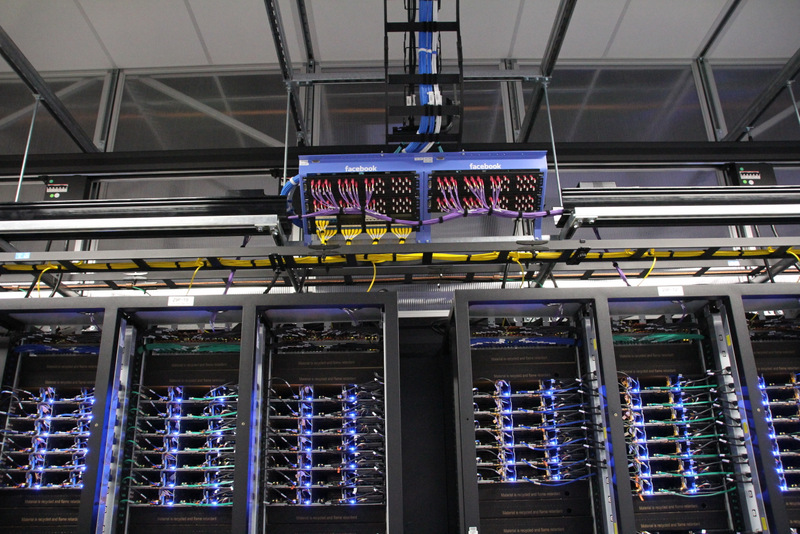
Facebook (arguably) owns more data than God.
Photos stolen from http://kellisis.wordpress.com/2013/10/17/photo-tour-inside-facebooks-new-high-tech-cold-storage-data-center-2/




Mark Collier, COO of the OpenStack Foundation, shows off some of the new services enabled by OpenStack Havana such as Metering and Orchestration.
OpenStack Havana
OpenStack Havana, the eighth release of the open source software for building public, private, and hybrid clouds, has nearly 400 new features to support software development, managing data and application infrastructure at scale. The OpenStack community continues to attract the best developers and experts in their disciplines with 910 individuals employed by 145 different organizations contributing to the Havana release.
Learn all about Havana at the Hong Kong OpenStack Summit
Audion – Mouth to Mouth – (Original Mix) @320 (HD)

Each disk in the cold storage gear can hold 4 terabytes of data, and each 2U system contains two levels of 15 disks. In other words, each unit can handle 120 terabytes. A rack could hold 16 of these storage systems, allowing for 2 petabytes of cold storage in a rack.
Source: http://www.datacenterknowledge.com/archives/2013/10/16/first-look-facebooks-oregon-cold-storage-facility/
You can read more at how to create this servers on
Hacking Conventional Computing Infrastructure » Open Compute …
www.opencompute.org/By releasing Open Compute Project technologies as open hardware, our goal is to develop servers and data centers following the model traditionally associated …
Facebook stores more than 240 billion photos, with users uploading an additional 350 million new photos every single day. To house those photos, Facebook’s data center team deploys 7 petabytes of storage gear every month.
500 OOPS: priv_sock_get_cmd
macbook:~ PJunior$ ftp [email protected]
Connected to example.com.
500 OOPS: priv_sock_get_cmd
ftp: Can't connect or login to host `example.com'
Open /etc/vsftpd.conf and at the end add
seccomp_sandbox=NO
and restart the Server:
sudo service vsftpd restart

macbook:~ PJunior$ ftp [email protected]
Connected to example.com.
500 OOPS: vsftpd: refusing to run with writable root inside chroot()
ftp: Can't connect or login to host `example.com'
Open /etc/vsftpd.conf and at the end add
allow_writeable_chroot=YES
and restart the Server:
sudo service vsftpd restart