While I was trying to preform an apt-get upgrade i got FATAL -> Failed to fork. error.
According to some fellows around, this issue was probably caused due to the lack of memory!, and it was… 🙂

Free it…. somehow…
Reboot the server?
While I was trying to preform an apt-get upgrade i got FATAL -> Failed to fork. error.
According to some fellows around, this issue was probably caused due to the lack of memory!, and it was… 🙂
Free it…. somehow…
Reboot the server?
You need to have PHP installed before. 🙂
Here y’a go…
Under root…..
yum -y update
Switch into the temp directory.
cd /tmp
Install Composer using cURL
curl -sS https://getcomposer.org/installer | php
Make Composer globally accessible
mv composer.phar /usr/local/bin/composer
So!,
letsencrypt renew output
Domain: www.domain.com
Type: unauthorized
Detail: Invalid response from
 http://www.domain.com/.well-known/acme-challenge/WLpdvugG3YzC53RTrZMJcYWsRqcj64vWLw43HNBkMN6:
nginx error log
66.133.XXX.XXX - - [11/Feb/2017:09:33:20 +0100] "GET /.well-known/acme-challenge/WLpdvugG3YzC53RTrZMJcYWsRqcj64vWLw43HNBkMN6 HTTP/1.1" 404 247 "http://www.domain.com/.well-known/acme-challenge/WLpdvugG3YzC53RTrZMJcYWsRqcj64vWLw43HNBkMN6" "Mozilla/5.0 (compatible; Let's Encrypt validation server; +https://www.letsencrypt.org)"
“Somehow” my domain root has changed.
I had to take a look at /etc/letsencrypt/renewal/domain.com.conf and fix some paths… 🙂
GETs
ngrep -q '^GET .* HTTP/1.[01]'
POSTs
ngrep -q '^POST .* HTTP/1.[01]'
Other solutions
ngrep -d eth0 -W byline port 80
So!,
I was trying to SSH a host…
Somehow it was requesting id_rsa.pub……… and asking for an password!

…
This is how I solved it…
ssh -v -i path/to/id_rsa [email protected]
!!
So!,
My nagios was returning a CRITICAL error on one of my servers…
and httpd server wasn’t responding….
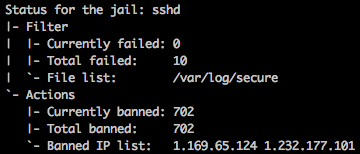
I think that problem was on IPTABLES / FAIL2BAN ban list. I had 702 banned IPs…
After I clean them up, everything went okay!
List entries with line numbers
iptables -L -v --line-numbers
Delete entry
iptables -D name_of_chain number_of_line_with_IP_that_you_want_to_delete
Let’s imagine that we want to unban 91.194.16.60! chain name is ‘f2b-sshd‘ and line number is 10!

iptables -D f2b-sshd 10
Example (banning some chinese sh*t)
iptables -A INPUT -s 119.249.54.0/24 -j DROP
iptables -A INPUT -s 121.18.238.0/24 -j DROP
I had to install WP-Mail-Bank in one of my WordPress pages/blogs/store, so it can send emails to *people* 🙂
I was getting “SMTP Error: Could not authenticate” on the test email tab.
I had to went to https://accounts.google.com/b/0/DisplayUnlockCaptcha and continue with this request. This gives us a 10min window to connect to Google in an *unsecure* way. Google detects the connection and allow it for the future.
Reference: http://stackoverflow.com/questions/3949824/smtp-error-could-not-authenticate-in-phpmailer
I realized that fail2ban wasn’t banning SSH fail login attempts…

My server’s time is different from the one being logged by rsyslog ’cause I had to change my timezones once…….. 🙂
Lets restart rsyslog.
sudo service rsyslog restart

Discourse has a recent (5month old?) template to handle with this.

Lets add – “templates/cloudflare.template.yml” to our templates scheme…
nano containers/app.yml
Save it and rebuild the app! 🙂
./launcher rebuild app

Et voilá!, my ISP (portuguese) IP! 🙂
