I’m tweaking a webapp for a client and he wants a button to copy some text to clipboard – mainly for mobile devices -.
This shit works!
On desktop browsers it works, on Chrome for Iphone, it selects the text inside the text-area and shows the native copy&past menu from the browser..
All posts by PF
Full trot

nginx – avoid 501 and 502 nginx errors
This are my settings on /etc/php5/fpm/pool.d/www.conf to avoid 501 and 502 nginx errors… on CentOS 7 location of www.conf is at /etc/php-fpm.d/.
The server has 16Gb RAM. This configuration is for a 8Gb RAM server so…
pm.max_children = 70
pm.start_servers = 20
pm.min_spare_servers = 20
pm.max_spare_servers = 35
pm.max_requests = 500
Sources & more readings
http://myshell.co.uk/blog/2012/07/adjusting-child-processes-for-php-fpm-nginx/
http://jeremymarc.github.io/2013/04/22/nginx-and-php-fpm-for-performance/
Amevicious – Disco Libertine (Mark E Remix) – NEIN030
modsecurity – MULTIPART_UNMATCHED_BOUNDARY
Forbidden
You don’t have permission to access /phpmyadmin/import.php on this server.
WOW!
PHP Warning: POST Content-Length of 9028812 bytes exceeds the limit of 8388608 bytes in Unknown on line
Looks like modsecurity is working…
ModSecurity: Access denied with code 403 (phase 2). Match of "eq 0" against "MULTIPART_UNMATCHED_BOUNDARY" required. [file "/etc/modsecurity/modsecurity.conf"] [line "80"] [id "200003"] [msg "Multipart parser detected a possible unmatched boundary."]
OK!, lets comment some lines @ modsecurity.conf and then restart apache to solve it…
nano /etc/modsecurity/modsecurity.conf
lets comment the following lines
SecRule MULTIPART_UNMATCHED_BOUNDARY "!@eq 0" \
"id:'200003',phase:2,t:none,log,deny,msg:'Multipart parser detected a possible unmatched boundary.'"
and then restart apache
service apache2 restart
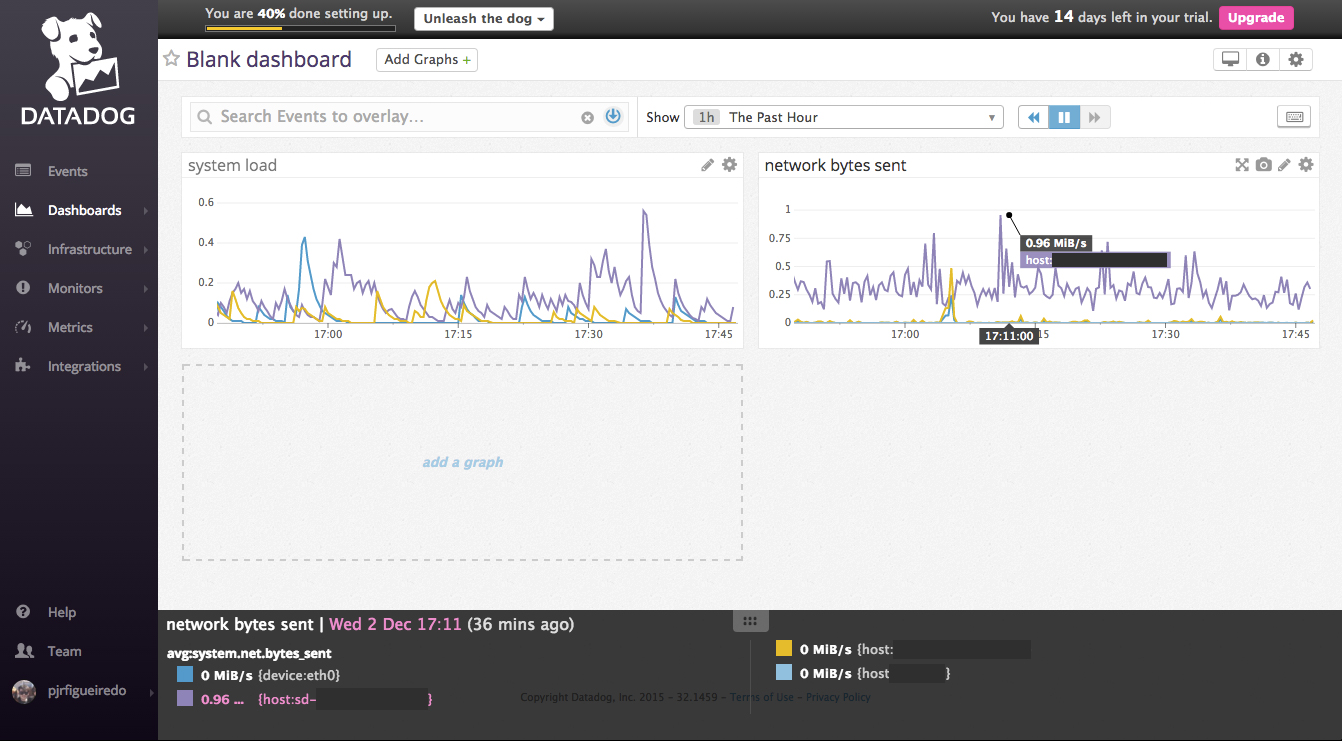
Just signed up on Datadog
Yah!,

I was looking for some monitoring tool…
I’v signed up on Datadog… why?
It has some awesome clients and the free account handles 5 hosts…
It took me less than 5 minutes to have it working and pumping graphics!
Last month cloudflare stats for one of my domains…


Force www on a domain with apache
This is how!
Edit a .conf (in my case I have a redirects.conf) for this kind of redirects….
nano /etc/apache2/sites-enabled/redirects.conf
And add the following lines…
<VirtualHost *:80>
    ServerName example.com
    Redirect permanent / http://www.example.com/
</VirtualHost>
and naturally restart apache! 😉
service apache2 restart
Enabling cgi-bin on apache
I had to enable CGI on this new recent server
sudo a2enmod cgi
sudo service apache2 restart
Simple!,
But I was getting a error script not found or unable to stat
[Mon Nov 30 18:00:32.380748 2015] [cgi:error] [pid 18799] [client 84.91.XXX.XXX:62545] script not found or unable to stat: /usr/lib/cgi-bin/HiPGZ23est4
I had to edit the .conf file
nano /etc/apache2/sites-enabled/domain.com.conf
and add the following lines
ScriptAlias /cgi-bin/ /path_to_cgi_folder/cgi-bin/
<Directory "/path_to_cgi_folder/cgi-bin/">
 AllowOverride None
 Options +ExecCGI -MultiViews +SymLinksIfOwnerMatch
 Order allow,deny
 Allow from all
</Directory>
and then reload the apache configurations
service apache2 reload
More speed tests…
From
To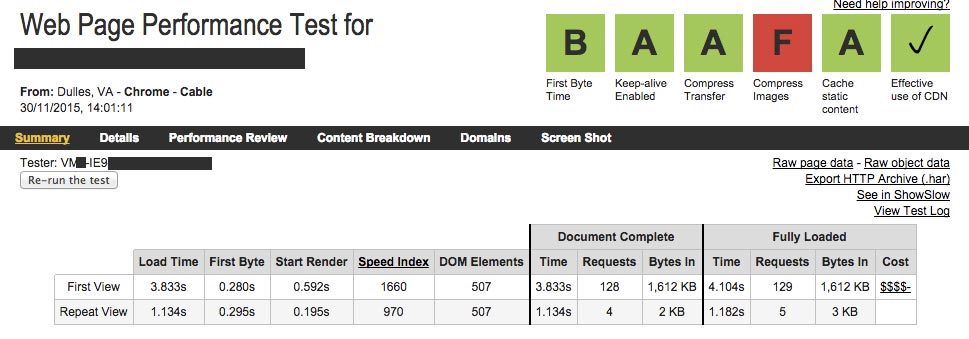
Simply by tweaking apache confs and using cloudflare…