All posts by PF
Free flat round icons set – 60 icons

Identifying Back Doors, Attack Points, and Surveillance Mechanisms in iOS Devices
Upon receipt of a valid search warrant, Apple can extract certain categories of active data from passcode locked iOS devices. Specifically, the user generated active files on an iOS device that are contained in Apple’s native apps and for which the data is not encrypted using the passcode (“user generated active files”), can be extracted and provided to law enforcement on external media. Apple can perform this data extraction process on iOS devices running iOS 4 or more recent versions of iOS. Please note the only categories of user generated active files that can be provided to law enforcement, pursuant to a valid search warrant, are: SMS, photos, videos, contacts, audio recording, and call history. Apple cannot provide: email, calendar entries, or any third-party App data.
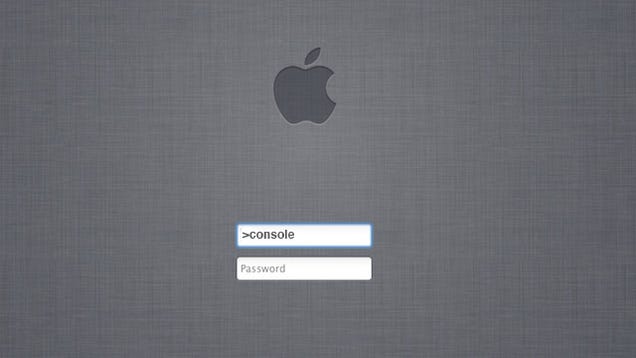
Mac – Console mode from login screen
“MySQL server has gone away” with CodeIgniter and MySQL
I’v stopped using CodeIgniter for 7 months, but I maintaining a product that was developed under CI.

Today I’v got a error saying “MySQL server has gone away” after a long time PHP execution.
I’v managed to solve it by, on the model that was getting me the error, *reconnect* to the database .
Before the *command* i’v added $this->db->reconnect();
 $this->db->reconnect();
 $this->db->insert('photoGallery', $data);
 return $this->db->insert_id();
Hope it helps anyone out there.
ReactPHP tools


- Predis/Async
- Redis Client

- DNode-PHP
- DNode Bindings
- Wisdom
- Domain Checker
- React/ZMQ
- ZeroMQ Bindings

- React/STOMP
- STOMP Bindings
- React/Promise
- Callback Heaven

- React/Async
- Async Utilities
- React/Curry
- Currying
- React/Whois
- Whois Client

- React/Chatroulette
- Sample app

- React/Gifsocket
- Real Time Animated Gif
Laravel 4 Real Time Chat by Christopher Pitt
Laravel 4 is a huge step forward for the PHP community. It’s beautifully written, full of features and the community is presently exploding. We’re going to use it to create a socket based, real time chat application.

https://medium.com/laravel-4/laravel-4-real-time-chat-eaa550829538
Tools
http://emberjs.com/
http://socketo.me/
http://reactphp.org/
XMLRPC – Programmatically post on WordPress with an attach image to post in WordPress
This is how I make it!
Shared on StackOverflow
http://stackoverflow.com/questions/17722743/attach-image-to-post-in-wordpress-xmlrpc/24413781#24413781
References
http://codex.wordpress.org/XML-RPC_WordPress_API/Posts
http://codex.wordpress.org/Post_Status
require_once("IXR_Library.php.inc");

$title = 'My title';

$body = 'My body';

$category="category1, category2"; // Comma seperated pre existing categories. Ensure that these categories exists in your blog.

$keywords="keyword1, keyword2, keyword3";

$customfields=array('key'=>'Author-bio', 'value'=>'Autor Bio Here'); // Insert your custom values like this in Key, Value format
$title = htmlentities($title,ENT_NOQUOTES,@$encoding);
$keywords = htmlentities($keywords,ENT_NOQUOTES,@$encoding);
$content = array(
'post_title'=>$title,
'post_content'=>$body,
'post_type'=>'some_custom_post_type',
'post_status' => 'draft', // http://codex.wordpress.org/Post_Status
'mt_allow_comments'=>0, // 1 to allow comments
'mt_allow_pings'=>0, // 1 to allow trackbacks
'mt_keywords'=>$keywords,
'categories'=>array($category),
'custom_fields' => array($customfields)
);
// Create the client object
$client = new IXR_Client('http://example.com/xmlrpc.php');
$username = "wp_username";
$password = "wp_username_password";
$params = array(0,$username,$password,$content,true); // Last parameter is 'true' which means post immediately, to save as draft set it as 'false'
if (!$client->query('wp.newPost', $params)) {
die('Something went wrong - '.$client->getErrorCode().' : '.$client->getErrorMessage().'');
}
else
{
$post_id = $client->getResponse();
echo 'Inserted with id'.$post_id;
$picture = '/full/path/to/pic.jpg';
$content = array(
'name' => basename($picture),
'type' => mime_content_type($picture),
'bits' => new IXR_Base64(file_get_contents($picture)),
true
);
if (!$client->query('metaWeblog.newMediaObject', 1, $username, $password, $content)) {
die('
Something went wrong - newMediaObject'.$client->getErrorCode().' : '.$client->getErrorMessage().'
');
}
else
{
$media = $client->getResponse();
$content = array(
'post_status' => 'publish',
'post_thumbnail' => $media['id']
);
if (!$client->query('wp.editPost', 0, $username, $password, $post_id, $content)) {
die('
Something went wrong editPost - '.$client->getErrorCode().' : '.$client->getErrorMessage().'
');
}
}
}
Dan Croll – From Nowhere (Baardsen Remix) – GTA V Soundtrack
Download YouTube videos
Clip Converter is a free online media conversion application, which allows you to reocord, convert and download nearly any audio or video URL to common formats. Currently supported services: YouTube (HQ, HD, 4K), Vimeo and many more. This free and fast converter allows you to watch your favorite YouTube videos on your cell phone, PSP, iPhone or nearly any other device.
How to convert and download a YouTube video:
1. Paste your YouTube URL at ‘Media URL’ and press Continue.
2. Select the format and the options for the conversion. The default options are for most videos a good setting.
3. Press the ‘Start’ button at the bottom to start the conversion.
4. This may take several minutes. After the conversion is finished you can download the converted file.