I was installing ajenti on the R420 with the following commands
wget http://repo.ajenti.org/ajenti-repo-1.0-1.noarch.rpm
rpm -i ajenti-repo-1.0-1.noarch.rpm
and I got the following errors…
--> Finished Dependency Resolution
Error: Package: python-daemon-1.5.2-1.el6.noarch (ajenti)
Requires: python-lockfile
Error: Package: reconfigure-0.1.36-1.noarch (ajenti)
Requires: python-chardet
You could try using --skip-broken to work around the problem
You could try running: rpm -Va --nofiles --nodigest

So, looks like that we need EPEL to have it running…
There’s a installation for CentOS 5 and another to CentOS 6… witch is yours?
cat /etc/*-release
CentOS 5.X
wget http://dl.fedoraproject.org/pub/epel/5/x86_64/epel-release-5-4.noarch.rpm
wget http://rpms.famillecollet.com/enterprise/remi-release-5.rpm
sudo rpm -Uvh remi-release-5*.rpm epel-release-5*.rpm
CentOS 6.X (tested with CentOS 6.4)
wget http://dl.fedoraproject.org/pub/epel/6/x86_64/epel-release-6-8.noarch.rpm
wget http://rpms.famillecollet.com/enterprise/remi-release-6.rpm
sudo rpm -Uvh remi-release-6*.rpm epel-release-6*.rpm
Edit remi.repo
sudo vi /etc/yum.repos.d/remi.repo
In [remi] change enable=0 to enable=1
name=Les RPM de remi pour Enterprise Linux $releasever - $basearch
#baseurl=http://rpms.famillecollet.com/enterprise/$releasever/remi/$basearch/
mirrorlist=http://rpms.famillecollet.com/enterprise/$releasever/remi/mirror
enabled=1
gpgcheck=1
gpgkey=file:///etc/pki/rpm-gpg/RPM-GPG-KEY-remi
failovermethod=priority
Hit again! It will work!
yum install ajenti

You migth want to open 8000 door on your firewall.
# vi /etc/sysconfig/iptables
Add this two line to the end of the file, and save it.
-A INPUT -p udp -m state --state NEW --dport 8000 -j ACCEPT
-A INPUT -p tcp -m state --state NEW --dport 8000 -j ACCEPT
Restart iptables
service iptables restart
I need to access root under my Ubuntu 12.04.3 LTS, to accomplish some in-chain commands, but I had no idea what is/was the password….
pjrfigueiredo@pornrack:~$ sudo wget http://repo.ajenti.org/debian/key -O- | apt-key add -
[sudo] password for pjrfigueiredo: ERROR: This command can only be used by root.
This is how I easily solved it…
sudo passwd
Voilá!
pjrfigueiredo@pornrack:~$ sudo passwd
Enter new UNIX password:
Retype new UNIX password:
passwd: password updated successfully
pjrfigueiredo@pornrack:~$ su
Password:
root@pornrack:/home/pjrfigueiredo# wget http://repo.ajenti.org/debian/key -O- | apt-key add -
--2013-11-01 23:05:56-- http://repo.ajenti.org/debian/key
Resolving repo.ajenti.org (repo.ajenti.org)... 108.161.187.129
Connecting to repo.ajenti.org (repo.ajenti.org)|108.161.187.129|:80... connected.
HTTP request sent, awaiting response... 200 OK
Length: 1716 (1.7K) [application/octet-stream]
Saving to: `STDOUT'100%[========================================================================================================================================>] 1,716 --.-K/s in 0.002s
2013-11-01 23:05:56 (1.01 MB/s) - written to stdout [1716/1716]
OK

I will use Tears of Steel to perform the FFMPEG work on the Dell R420.
They share the movie in several formats and sizes to download.
“Tears of Steel” — project Mango — is Blender Foundation’s fourth short film project, with as sole purpose to improve and validate Blender’s open source 3D VFX pipeline. The entire film been processed and created by free/open source software, from initial camera tracking to the final edit and grading. In October 2012, the film and all its assets will be released as Creative Commons Attribution.
Uncompressed files
http://media.xiph.org/tearsofsteel/
Some links
http://www.imdb.com/title/tt2285752/
http://www.youtube.com/watch?v=R6MlUcmOul8
http://www.youtube.com/watch?v=WwHux5QZfC8

The National Security Agency has secretly infiltrated the main communications links connecting worldwide data centers of Yahoo and Google, Washington Post’s Barton Gellman and Ashkan Soltani report.
Read more: http://www.businessinsider.com/nsa-infiltrated-both-yahoo-and-google-2013-10#ixzz2jENRzVcf
This is how I do it!
ls -l -R /path/ | wc -l
Zencoder is the performance leader in cloud-based video encoding, with the fastest and most widely used solution in the market. Fast encoding speeds, extreme scalability, and an easy API integration enable content providers to quickly deploy Internet video to consumers on virtually any Internet connected device. Seamless integration with Aspera high-speed transfers ensures the fastest content ingest significantly shortening end-to-end production time.
JOINT FEATURE HIGHLIGHTS
- Aspera fasp embedded directly within Zencoder
- Ensures maximum transfer speed of the media files and immediate start and parallel processing of encoding jobs
“We’re seeing upwards of 500 megabits per second of throughput up to the cloud, which, depending on some variables, is an incredible improvement above just standard FTP or HTTP.” A transfer of a one-hour DNxHD video file that could take 10 hours over FTP, now completes in less than 26 minutes using Aspera. On top of high-speed transfers, Aspera’s patented fasp transfer technology encrypts files in transit and at rest, assuring bulletproof security for business-critical content.
Source: http://asperasoft.com/fileadmin/media/Case_Studies/Zencoder_AsperaCS.pdf

After reading documents and tutorials on MapReduce and Hadoop and playing with RHadoop for about 2 weeks, finally I have built my first R Hadoop system and successfully run some R examples on it. My experience and steps to achieve that are presented at http://www.rdatamining.com/tutorials/rhadoop. Hopefully it will make it easier to try RHadoop for R users who are new to Hadoop. Note that I tried this on Mac only and some steps might be different for Windows.
1. Install Hadoop
2. Run Hadoop
3. Install R
4. Install RHadoop
5. Run R jobs on Hadoop
6. What’s Next
Not yet test, but in the next 2/3 weeks I will!
YouTube Wordcount MapReduce in R
http://www.youtube.com/watch?v=hSrW0Iwghtw

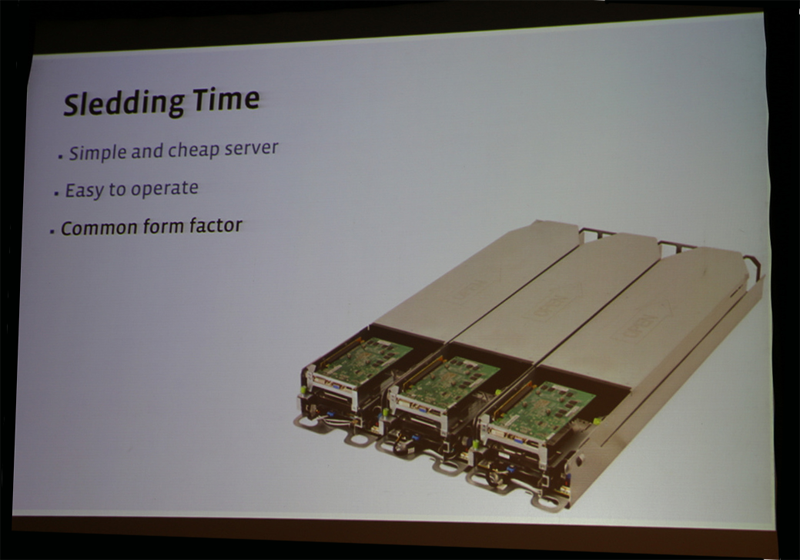
Facebook has been able to quantify energy efficiency gains of 38% for new servers conforming to the specs of The Open Compute Project, said Matt Corddry, Director of Hardware Engineering at Facebook, speaking at the Open Server Summit in Santa Clara, California. Moreover, the new servers deliver a 24% cost savings compared to generic OEM servers.
The Open Compute Project, which Facebook launched in April 2011, has resulted in vastly simplified Compute Servers, Storage JBODs and an innovative Open Rack System.
Source: http://www.convergedigest.com/2013/10/open-server-summit-open-compute.html