Category Archives: Linux

Block Visitors by Country 

A client needs to get a certain country blocked with .htaccess – or redirected -.
I’m gonna let some links of the solutions here…

Blocking an entire country stops most traffic coming from their IP ranges. 
This method isn’t 100% because some countries have slightly overlapping IP ranges.

Incredibill

http://incredibill.me/htaccess-block-country-ips

  • .htaccess

http://www.ip2location.com/blockvisitorsbycountry.aspx 

  • .htaccess
  • Linux IPtable
  • CIDR

http://wordpress.org/plugins/ip2location-country-blocker/

  • Wordpres Plugin


SFTP/SSH Write failed: Broken pipe

I was trying to access via SFTP and SSH to a host, and I was getting some strange errors…
yesterday it was okay….

ssh [email protected]
[email protected]'s password:
Write failed: Broken pipe

I’v sshed with other user and changed to a root user.
Had to read the auth.log file to figure out what was going on.

root@sd-11111:/home/mike# tail -f /var/log/auth.log

So… this is what I got.

May 28 13:45:31 sd-11111 sshd[1676]: Accepted password for mike from 84.91.4.220 port 59004 ssh2
May 28 13:45:31 sd-11111 sshd[1676]: pam_unix(sshd:session): session opened for user mike by (uid=0)
May 28 13:45:31 sd-11111 systemd-logind[447]: Removed session 4.
May 28 13:45:31 sd-11111 systemd-logind[447]: New session 5 of user mike.
May 28 13:45:32 sd-11111 sshd[1694]: fatal: bad ownership or modes for chroot directory "/home/mike"
May 28 13:45:32 sd-11111 sshd[1676]: pam_unix(sshd:session): session closed for user mike

The solution was to do the following…

root@sd-11111:/home# sudo chown root:root /home/mike/
root@sd-11111:/home# sudo chmod 755 /home/mike/



Linux disks structure and information

This is a result on a dedicated server.

Disk structure
sudo lsblk -o NAME,FSTYPE,SIZE,MOUNTPOINT,LABEL

NAME FSTYPE SIZE MOUNTPOINT LABEL sda 465.8G |-sda1 ext4 190M /boot |-sda2 ext4 464.6G / `-sda3 swap 976M [SWAP]

Disk details
sudo hdparm -I /dev/sda


/dev/sda:

ATA device, with non-removable media
Model Number: TOSHIBA MQ01ABF050H
Serial Number: 14IFC0D3T
Firmware Revision: ARF02A
Transport: Serial, ATA8-AST, SATA 1.0a, SATA II Extensions, SATA Rev 2.5, SATA Rev 2.6, SATA Rev 3.0
Standards:
Supported: 8 7 6 5
Likely used: 8
Configuration:
Logical max current
cylinders 16383 16383
heads 16 16
sectors/track 63 63
--
CHS current addressable sectors: 16514064
LBA user addressable sectors: 268435455
LBA48 user addressable sectors: 976773168
Logical Sector size: 512 bytes
Physical Sector size: 4096 bytes
Logical Sector-0 offset: 0 bytes
device size with M = 1024*1024: 476940 MBytes
device size with M = 1000*1000: 500107 MBytes (500 GB)
cache/buffer size = unknown
Form Factor: 2.5 inch
Nominal Media Rotation Rate: 5400
Capabilities:
LBA, IORDY(can be disabled)
Queue depth: 32
Standby timer values: spec'd by Standard, no device specific minimum
R/W multiple sector transfer: Max = 16 Current = 16
Advanced power management level: 254
DMA: sdma0 sdma1 sdma2 mdma0 mdma1 mdma2 udma0 udma1 udma2 udma3 udma4 *udma5
Cycle time: min=120ns recommended=120ns
PIO: pio0 pio1 pio2 pio3 pio4
Cycle time: no flow control=120ns IORDY flow control=120ns
Commands/features:
Enabled Supported:
* SMART feature set
Security Mode feature set
* Power Management feature set
* Write cache
* Look-ahead
* Host Protected Area feature set
* WRITE_BUFFER command
* READ_BUFFER command
* NOP cmd
* DOWNLOAD_MICROCODE
* Advanced Power Management feature set
Power-Up In Standby feature set
SET_MAX security extension
* 48-bit Address feature set
* Device Configuration Overlay feature set
* Mandatory FLUSH_CACHE
* FLUSH_CACHE_EXT
* SMART error logging
* SMART self-test
* General Purpose Logging feature set
* WRITE_{DMA|MULTIPLE}_FUA_EXT
* 64-bit World wide name
* IDLE_IMMEDIATE with UNLOAD
* WRITE_UNCORRECTABLE_EXT command
* {READ,WRITE}_DMA_EXT_GPL commands
* Segmented DOWNLOAD_MICROCODE
* Gen1 signaling speed (1.5Gb/s)
* Gen2 signaling speed (3.0Gb/s)
* Gen3 signaling speed (6.0Gb/s)
* Native Command Queueing (NCQ)
* Host-initiated interface power management
* Phy event counters
* Idle-Unload when NCQ is active
* Host automatic Partial to Slumber transitions
* Device automatic Partial to Slumber transitions
* READ_LOG_DMA_EXT equivalent to READ_LOG_EXT
DMA Setup Auto-Activate optimization
Device-initiated interface power management
* Software settings preservation
* SMART Command Transport (SCT) feature set
* SCT Write Same (AC2)
* SCT Error Recovery Control (AC3)
* SCT Features Control (AC4)
* SCT Data Tables (AC5)
Security:
Master password revision code = 65534
supported
not enabled
not locked
frozen
not expired: security count
supported: enhanced erase
114min for SECURITY ERASE UNIT. 114min for ENHANCED SECURITY ERASE UNIT.
Logical Unit WWN Device Identifier: 5000039543a063f1
NAA : 5
IEEE OUI : 000039
Unique ID : 543a063f1
Checksum: correct

Read more at http://askubuntu.com/questions/182446/how-do-i-view-all-available-hdds-partitions http://www.cyberciti.biz/faq/find-hard-disk-hardware-specs-on-linux/

SFTP – Restrain/Lock/Jail the user to their home

Create the user and their home
cd /home
mkdir username
useradd -d /home/username -M -N -g users username
sudo chown root:root /home/username
sudo chmod 755 /home/username
Edit /etc/ssh/sshd_config
nano /etc/ssh/sshd_config

Search for “lib/openssh/sftp-server” and make it like

#Subsystem sftp /usr/lib/openssh/sftp-server
Subsystem sftp internal-sftp

Add the following lines bellow it…

Match User username
    ChrootDirectory /home/username
    ForceCommand internal-sftp
Restart SSH
service ssh restart

More readings
http://www.techrepublic.com/blog/linux-and-open-source/chroot-users-with-openssh-an-easier-way-to-confine-users-to-their-home-directories/
http://superuser.com/questions/370953/how-to-not-allow-user-outside-of-home-directory-with-sftp

rsync don’t overwrite existing files

Moving 500Gb from a server to another isn’t easy!
Especially with thousands of files to move….

I was using scp but connection most of the times was reseted and all that kinda of sh*ts.
rsync does the job. Its awesome. It syncs folders from server1 with server2 and with -z

rsync -avz /home/www/host1/tools.* [email protected]:/home/www/host1


-v, --verbose increase verbosity
-a, --archive archive mode; same as -rlptgoD (no -H)
-z, --compress compress file data during the transfer

Read more at http://linuxcommand.org/man_pages/rsync1.html

iptables – remove fail2ban entry

This is how!

root@sd-30000:~# iptables -L --line-numbers
Chain INPUT (policy ACCEPT)
num target prot opt source destination 
1 fail2ban-ssh tcp -- anywhere anywhere multiport dports ssh
2 DROP all -- 205.51.174.61.dial.wz.zj.dynamic.163data.com.cn anywhere

Chain FORWARD (policy ACCEPT)
num target prot opt source destination

Chain OUTPUT (policy ACCEPT)
num target prot opt source destination

Chain fail2ban-ssh (1 references)
num target prot opt source destination 
1 REJECT all -- bl7-128-82.dsl.telepac.pt anywhere reject-with icmp-port-unreachable
2 RETURN all -- anywhere anywhere 
root@sd-31453:~# iptables -D fail2ban-ssh 1

Peace!

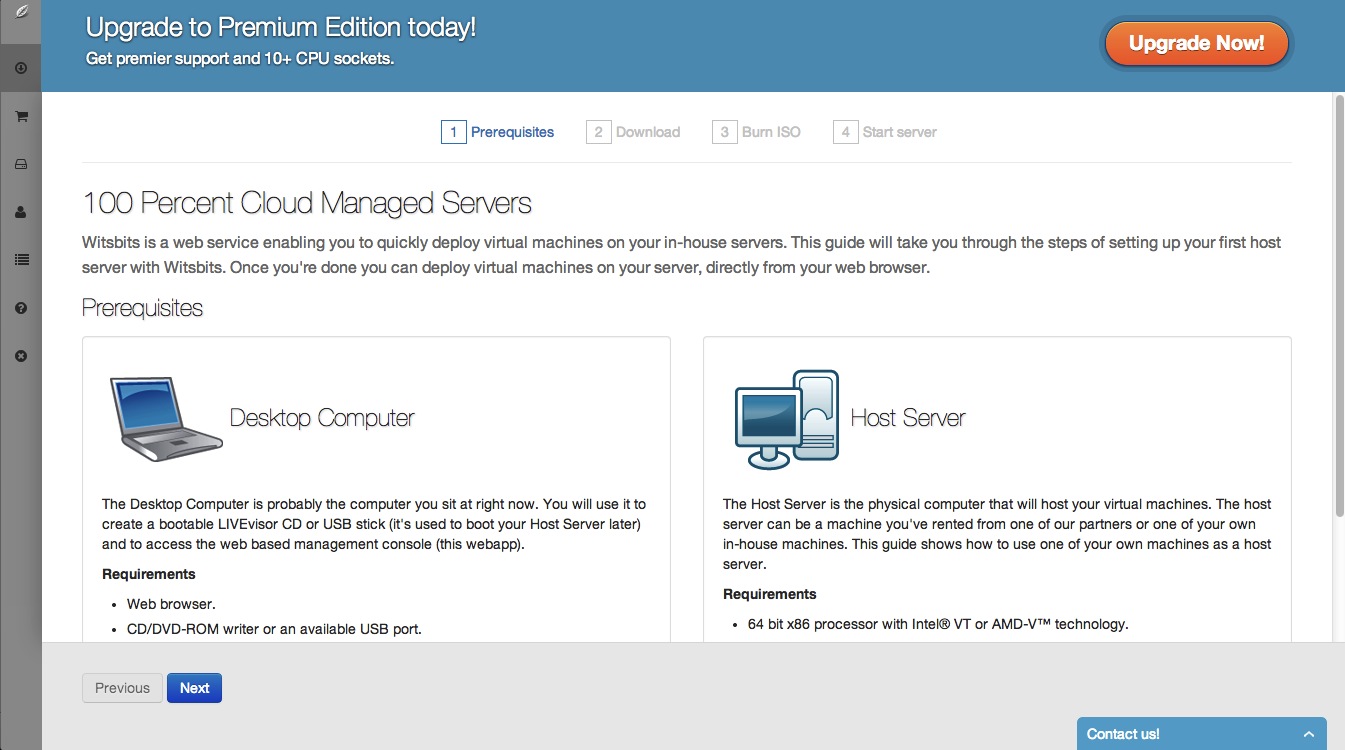
Virtualization hardware requirements?

The Host Server is the physical computer that will host your virtual machines. The host server can be a machine you’ve rented from one of our partners or one of your own in-house machines. This guide shows how to use one of your own machines as a host server.

Requirements

  • 64 bit x86 processor with Intel® VT or AMD-V™ technology.

  • CD/DVD-ROM reader or USB port.

  • Minimum 1 GB of RAM.

  • Hard drive (min 20 GB) or NFS storage.


witsbits2

witsbits.com