Category Archives: Utilities

Download YouTube videos


Clip Converter is a free online media conversion application, which allows you to reocord, convert and download nearly any audio or video URL to common formats. Currently supported services: YouTube (HQ, HD, 4K), Vimeo and many more. This free and fast converter allows you to watch your favorite YouTube videos on your cell phone, PSP, iPhone or nearly any other device.

How to convert and download a YouTube video:
1. Paste your YouTube URL at ‘Media URL’ and press Continue.
2. Select the format and the options for the conversion. The default options are for most videos a good setting.
3. Press the ‘Start’ button at the bottom to start the conversion.
4. This may take several minutes. After the conversion is finished you can download the converted file.

NAXSI: protecting websites with Nginx

NAXSI is Nginx Anti XSS & SQL injection. In simple words, it’s a firewall for web applications (WAF) for Nginx, protecting from XSS, SQL injections, CSRF, Local & Remote file inclusions. NAXSI is known for its fast working and simple configuring. It’s a good alternative for mod_security in Apache.

What would you need NAXSI for?

It’s obvious that’s the best way of protection from attacks is correctly written code, but in some situations WAF and particularly NAXSI can help:

  • low quality of site code with no resources or possibilities of rewriting it;
  • closed source code in which fixing mistakes is impossible;
  • the quality of code is unknown and unpredictable (i.e. shared hosting).

Read more at http://howtounix.info/howto/naxsi-nginx-firewall

Got it from my friend from hexcode.org

Block Visitors by Country 

A client needs to get a certain country blocked with .htaccess – or redirected -.
I’m gonna let some links of the solutions here…

Blocking an entire country stops most traffic coming from their IP ranges. 
This method isn’t 100% because some countries have slightly overlapping IP ranges.

Incredibill

http://incredibill.me/htaccess-block-country-ips

  • .htaccess

http://www.ip2location.com/blockvisitorsbycountry.aspx 

  • .htaccess
  • Linux IPtable
  • CIDR

http://wordpress.org/plugins/ip2location-country-blocker/

  • Wordpres Plugin


Code-free, pixel perfect, Parallax Scrolling Animator

(…) Webydoa professional platform that lets designers create and manage websites for their clients without code. As its staff are all about putting designers in the driver’s seat, they let a community of more than 85,000 designers vote on new features to make it better. The results are out, and the most voted feature is now a reality—Webydo has invited you to try out its code-free, pixel perfect, Parallax Scrolling Animator that lets you create even more beautiful and immersive websites. 

Read more at: http://designtaxi.com/news/365726/Pixel-Perfect-Parallax-Scrolling-Test-Webydo-s-Code-Free-Animator/

Atom is now available for Mac users!


Atom is now available for Mac users and is open source, naturally. The company plans on releasing Linux and Windows versions very soon.

# Welcome to the Atom!

1. To help us improve the editor, Atom sends anonymous usage information. See
[atom/metrics](https://github.com/atom/metrics) for details on how to disable
the metrics package and what information is tracked.

2. If you only remember one thing make it `cmd-shift-P`. This keystroke toggles
the command palette, which lists every Atom command. Yes, you can try it now!
Press `cmd-shift-P`, type `markdown` and press enter. It will trigger the
`markdown-preview:show` command which renders this text to HTML.

4. Here is where you can get more help with Atom

* The [Atom docs](https://www.atom.io/docs) contain Guides and the API
reference.
* Discuss Atom at [discuss.atom.io](http://discuss.atom.io).
* The [Atom Org](https://github.com/atom). This is where all GitHub created Atom
packages can be found.

5. If you ever want to see this buffer again use the command palette
(`cmd-shift-P`) and search for `Welcome`.


“There is no other platform more flexible than the web, and so we built Atom using the same technologies. Extending Atom is as simple as writing JavaScript and CSS, two languages used by millions of developers each day, making it remarkably hackable,” the company wrote in an official blog post.

Read more at http://venturebeat.com/2014/05/06/githubs-young-text-editor-is-now-public-free-and-fully-open-source/
Baruwa, web 2.0 MailScanner front-end

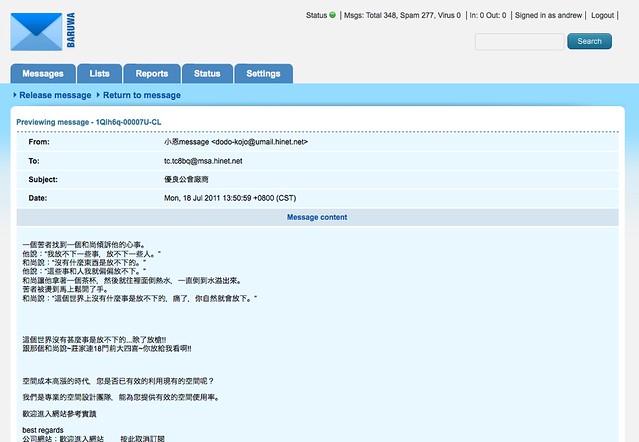
Baruwa (swahili for letter or mail) is a web 2.0 MailScanner front-end.

It provides an easy to use interface for managing a MailScanner installation. It is used to perform operations such as releasing quarantined messages, spam learning, whitelisting and blacklisting addresses, monitoring the health of the services etc. Baruwa is implemented using web 2.0 features (AJAX) where deemed fit, graphing is also implemented on the client side using SVG, Silverlight or VML. Baruwa has full support for i18n, letting you support any language of your choosing.

It includes reporting functionality with an easy to use query builder, results can be displayed as message lists or graphed as colorful and pretty interactive graphs.

Custom MailScanner modules are provided to allow for logging of messages to the mysql database with SQLite as backup, managing whitelists and blacklists and managing per user spam check settings.

Baruwa is open source software, written in Python/Perl using the Django Framework and MySQL for storage, it is released under the GPLv2 and is available for free download.