Push – Universal Nation (Original 12″ Mix)
Skydive (I Feel Wonderful) by Freefall ft. Jan Johnston. HQ Audio
List entries with line numbers
iptables -L -v --line-numbers
Delete entry
iptables -D name_of_chain number_of_line_with_IP_that_you_want_to_delete
Let’s imagine that we want to unban 91.194.16.60! chain name is ‘f2b-sshd‘ and line number is 10!

iptables -D f2b-sshd 10
Example (banning some chinese sh*t)
iptables -A INPUT -s 119.249.54.0/24 -j DROP
iptables -A INPUT -s 121.18.238.0/24 -j DROP
apt-get update && apt-get upgrade
apt-get install nagios-nrpe-server nagios-plugins
vi /etc/nagios/nrpe.cfg
Search for server_address and replace 120.0.0.1 for the public ip of this machine.
Search for allowed_hosts and replace 120.0.0.1 for the IP of your nagios server.
/etc/init.d/nagios-nrpe-server restart
That’s kinda it…



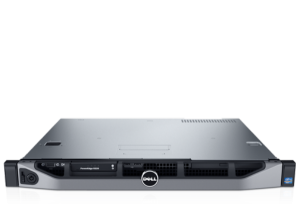
Got a new DELL R220 to replace two existing servers… the HP DL120G7 and the SuperMicro Intel® C2750 (Avoton).
Manufacturer: Dell PowerEdge R220
Processor: Xeon E3 1x Intel® Xeon® E3 1230 v3 4 C / 8T @3.3 Ghz cache L3 8MB, x64, VT
Memory: 32 GB DDR3 ECC
Storage: 2 × 2 TB SATA
This time, I’m using CentOS!
https://www.youtube.com/watch?v=InztBHAeLyE
As heard on https://soundcloud.com/nsaofficial/nsa-guest-mix-vol-8-tronik-youth.
“This certificate was signed by an untrusted issuer” problem after updating to Mac OS.
Your computer has expired certificates.
To solve this make the following actions:
Related links
