Category Archives: Linux

LogicMonitor – SaS Monitoring Service


Setting up the monitoring on all of your devices may seem daunting, but auto-discovery makes it simple. There is no need to know what objects on a device to monitor, or even how to configure them. All you need to know is the hostname or IP address, and Active Discovery does the identification and configuration. Some of the items that it looks for on each device include:

  • Interfaces
  • Volumes
  • Physical disks
  • Temperature sensors
  • Virtual IPs
  • VPN links
  • DSU/CSUs
  • Applications

Continue reading LogicMonitor – SaS Monitoring Service

Tools to monitor a Redis database?

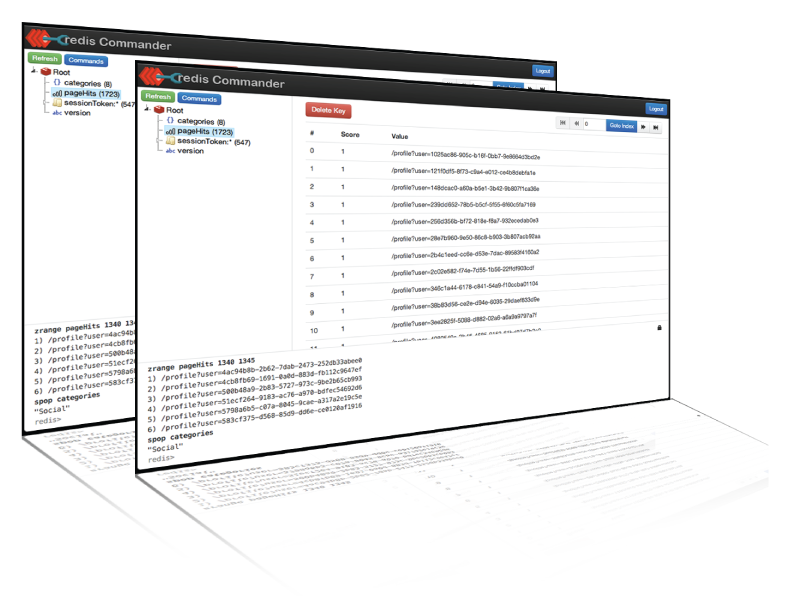
Redis Commander

Redis-Commander is a node.js web application used to view, edit, and manage a Redis Database

http://joeferner.github.io/redis-commander/


Redmon

Simple sinatra based dashboard for redis. After seeing the fnordmetric project I was inspired to write this. Some of the ideas there have be carried over here.

https://github.com/steelThread/redmon


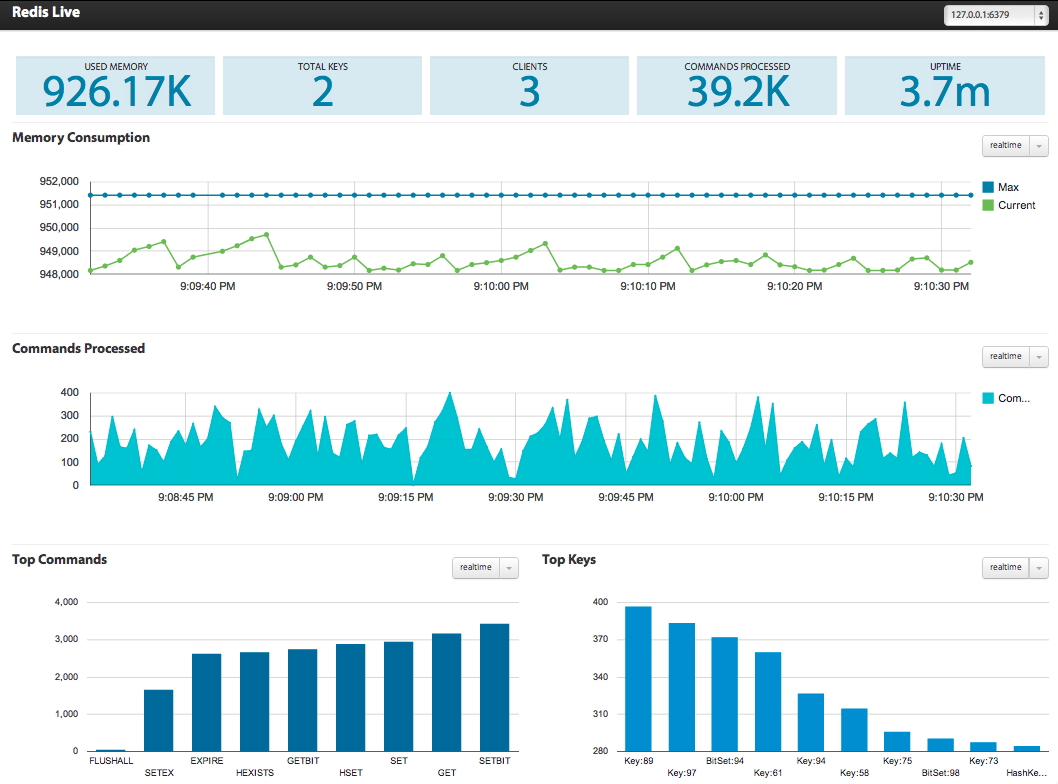
Real time dashboard for redis

I often find myself wondering how our redis instances are being used and which areas of the application are the heavy consumers. It’s also useful to predict how the memory consumption is growing over a period of time. Luckily, redis offers a couple of commands, INFO and MONITOR that expose some useful bits of information. Using the data from these two commands, it’s easy to build up a trend over a period of time.


http://www.nkrode.com/article/real-time-dashboard-for-redis


redis-stat

redis-stat is a simple Redis monitoring tool written in Ruby.

It is based on INFO command of Redis, and thus generally won’t affect the performance of the Redis instance unlike the other monitoring tools based on MONITOR command.

redis-stat allows you to monitor Redis instances

  • either with vmstat-like output from the terminal

  • or with the dashboard page served by its embedded web server.

https://github.com/junegunn/redis-stat


sensu – The open source monitoring framework.

Highly Composable

By providing an agent, message bus, & event processor, Sensu enables developers and operations teams to compose comprehensive telemetry systems to meet unique business requirements.

Designed for the Cloud

The Cloud introduces new challenges to monitoring tools, Sensu was created with them in mind. Sensu will scale along with the infrastructure that it monitors.

Passionate Community

The Sensu open source project is propelled by an ever growing community of passionate people, helping each other solve common problems, and working together to create solutions to new problems.

 Uchiwa -Official dashboard

http://sensuapp.org/docs/latest/dashboards_uchiwa

Continue reading sensu – The open source monitoring framework.

Sh*ts that I install on every new server to run wordpress and laravel

  • whois
  • htop
  • iotop (monitorize disk IO)
  • iostat (sysstat – monitorize disk IO)
  • fail2ban
    • sendmail
    • iptables-persistent
  • nginx
  • mysql
  • php-fpm
    • php5-mysql
    • php5-gd
    • php5-json
    • php5-curl
    • php5-mcrypt
    • libssh2-php
    • php5-cli
    • allow short_open_tag = On on /etc/php5/fpm/php.ini
  • curl
  • vnstat
  • vnstati
  • at
    • edit /etc/at.allow and /etc/at.deny to allow/deny specific users


– too much IO stats? IO is important!, if we are serving thousands of files per hour.


ssdvirtual


Continue reading Sh*ts that I install on every new server to run wordpress and laravel

Ubuntu 32bits or 64bits?

I’m setting up a new machine with 8cores and 8Gb of RAM.
I had to choose between Ubuntu 32bits or 64bits

Ubuntu 64bits was the choice. Why?

If you have more than 4 GB of RAM go for 64 bit else 32 bit is just fine.


Use 64bit in case you do

  • video editing and processing
  • sound editing and processing
  • graphic editing and processing
  • work with large files (e.g. databases, large log files,…)


Got it from http://askubuntu.com/questions/19803/for-better-performance-should-i-install-32-bit-or-64-bit


Simply backups under Linux

Backup a folder

tar -cvpzf /BackupDirectory/backupfilename.tar.gz /ImportantData/directory/path

c =  Create
v =  Verbose mode
p = Preserving Files and Directory Permissions.
z = This will tell tar that compress the files further to reduce the size of tar file.
f =  It is allows to tar get file name.

Backup a MySQL database

mysqldump --opt -u [username] -p[password] [dbname] > [dbname.sql]

Backup all MySQL databases

mysqldump -u root -p --all-databases > all_databases.sql

ssdvirtual

Intro to Linux – free on edX

Intro to Linux – free on edX from Linux Foundation


Learn Linux with This Free edX Course from the Linux Foundation

Intro to Linux is normally a $2,400 course from the Linux Foundation, but it’s being offered for free now on edX. If you’ve ever wanted to learn how to use the open source operating system, there’s no better time than now.

Source http://lifehacker.com/learn-linux-with-this-free-edx-course-from-the-linux-fo-1612770920

Strange characters, even using meta charset=”UTF-8″

I’v deployed a work on one of my clients – a french one – server and even using charset=”UTF-8″ meta in HTML, some characters were displayed different from what they should.

cópia was showed cópia

I had to add the following line to .htaccess – forcing the Charset to be UTF-8

AddDefaultCharset UTF-8

or

AddDefaultCharset Off

disabling Default Charset! 🙂

http://httpd.apache.org/docs/2.0/mod/core.html#adddefaultcharset

NAXSI: protecting websites with Nginx

NAXSI is Nginx Anti XSS & SQL injection. In simple words, it’s a firewall for web applications (WAF) for Nginx, protecting from XSS, SQL injections, CSRF, Local & Remote file inclusions. NAXSI is known for its fast working and simple configuring. It’s a good alternative for mod_security in Apache.

What would you need NAXSI for?

It’s obvious that’s the best way of protection from attacks is correctly written code, but in some situations WAF and particularly NAXSI can help:

  • low quality of site code with no resources or possibilities of rewriting it;
  • closed source code in which fixing mistakes is impossible;
  • the quality of code is unknown and unpredictable (i.e. shared hosting).

Read more at http://howtounix.info/howto/naxsi-nginx-firewall

Got it from my friend from hexcode.org